Build a Custom Image
If the pre-built images do not meet your needs, you can build your own Cloud AI Docker image using the Apps SDK scripts in common/tools/docker-build/. The QAic Docker image build scripts have the following structure:
├── build_image.py
├── config
│   ├── applications
│   ├── base_image
│   ├── build_type
│   ├── python_version
│   └── sdk
├── image_schema.json
├── README.md
├── requirements.txt
└── sample_user_specs
Download SDK Packages
Download Apps SDK and Platform SDK from Qualcomm Package Manager.
Docker containers require the Cloud AI device drivers to communicate with the devices. Install the Platform SDK on the host bare metal OS or VM.
Unzip Apps SDK and the build scripts are located under
common/tools/docker-build/
unzip aic_apps.Core.1.21.2.0.Linux-AnyCPU.zip
cd qaic-apps-1.21.2.0/common/tools/docker-build/
Install python modules listed in requirements.txt, preferably in a virtual environment
python3.10 -m venv /venv_directory/qaic_docker_venv
. /venv_directory/qaic_docker_venv/bin/activate
(qaic_docker_venv) $ pip install -r requirements.txt
Build Image
The QAic Docker build script is used to create a new Docker image that includes the Qualcomm Cloud AI Apps SDK and Platform SDK on a supported operating system.
The command to build the Docker image is:
python3 build_image.py [ --user_specification_file (Required) <user-specification-json-file-path> ] \
[ --mirror (Optional) <docker-registry-mirror-location> ] \
[ --apps_sdk (Optional) /qaic/apps/sdk/zip/path ] [ --platform_sdk (Optional) /qaic/platform/sdk/zip/path ] [ --qnn_sdk (Optional) ] \
[ --arch (Optional) <x86_64|aarch64> ] [ --external_dist_files (Optional) <file-path-1 file-path-2 ... file-path-n> ] \
[ --tag (Optional) <tag-for-the-created-image> ] [ --log_level (Optional) <log-level-numeric-value>] [ --no_cache (Optional) ]
The resulting Docker image is named by the convention:
qaic-\<arch>-<base_image>-<build_type>-<python_version>-<sdk_types>-\<applications>:\<tag>
Build Configuration Options
The following options are used to configure the Docker image build process for Cloud AI Inference containers.
Option |
Description |
|---|---|
|
Specifies the path to the user specification JSON file that defines image build parameters and dependencies. |
|
Specifies the registry mirror location for base images in Docker format
(for example, |
|
Specifies the target architecture for the image build. Supported values
are |
|
Specifies the tag to assign to the generated Docker image. |
|
Specifies the path to the Apps SDK ZIP file. This option overrides the
corresponding value if it is already specified in the
|
|
Specifies the path to the Platform SDK ZIP file. This option overrides the
corresponding value if it is already specified in the
|
|
Specifies external files required during the Docker image build. This
option overrides any |
|
Specifies the logging verbosity using a numeric value:
|
|
Disables Docker’s internal layer cache during the image build. This option is typically used for debugging. |
For example:
python3 build_image.py --user_specification_file ./sample_user_specs/user_image_spec_qaic.json --apps_sdk /path/to/aic_apps.Core.1.21.2.0.Linux-AnyCPU.zip \
--platform_sdk /path/to/aic_platform.Core.1.21.2.0.Linux-AnyCPU.zip --tag 1.21.2.0
To check the Docker image created with above script:
docker images
REPOSITORY                                                            TAG            IMAGE ID       CREATED        SIZE
qaic-x86_64-ubuntu22-py310-py38-release-qaic_platform-qaic_apps       1.21.2.0       f784c37d7f18   2 hours ago    4.25GB
Supported Operating Systems
Docker container for Qualcomm Cloud AI supports different operating system distributions. Please check supported operating environments.
Features
Incremental Docker image build infrastructure optimizes disk usage and rebuilding time
Flexibility to override specification options such as sdk paths, external dist files through command line options
User provided image specification is resolved for dependencies and dumped as autocompleted_user_specification.json
Supports multi-platform builds
Incremental Build Layers
The configurations are grouped as shown below to minimize the need for rebuild and to allow sharing layers. This enables reduction of disk usage and allows faster rebuild.
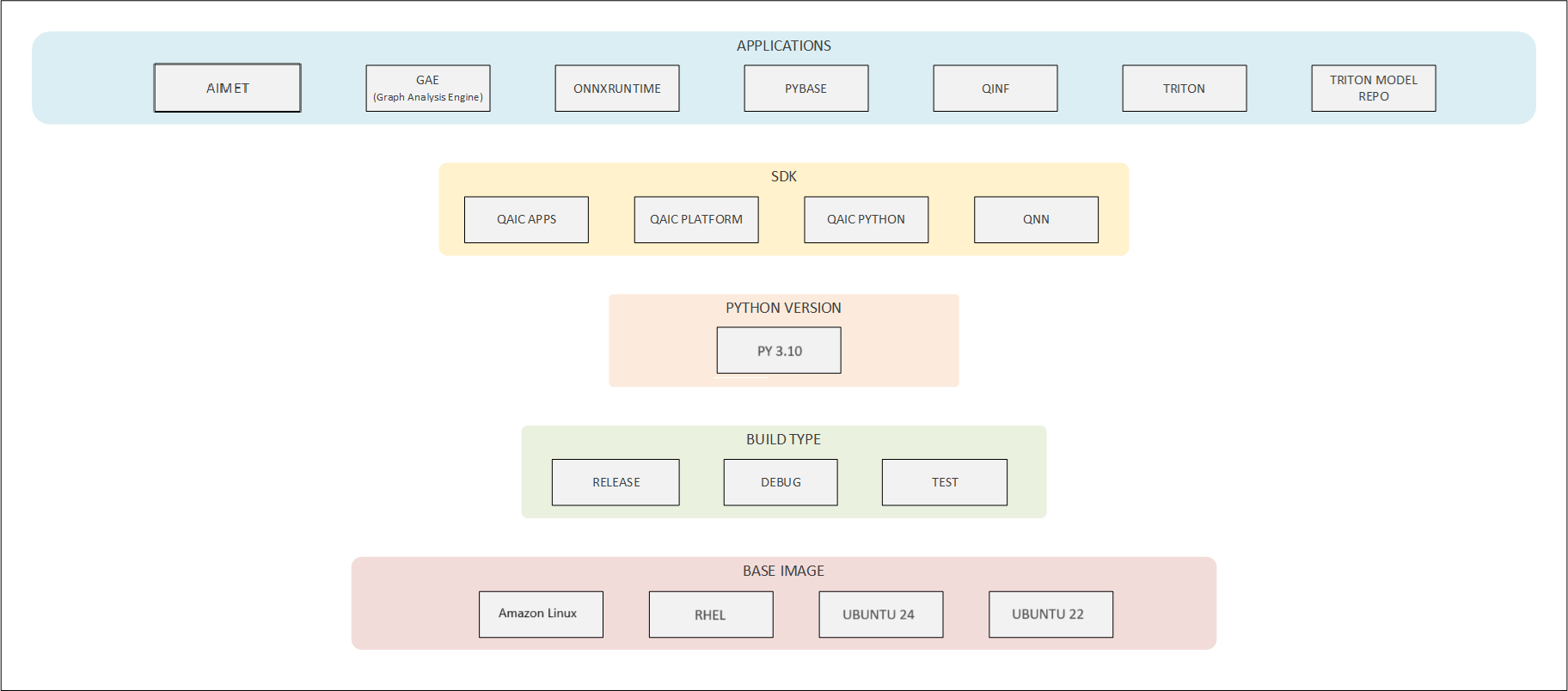
Image Specification
The user provides a specification JSON file that defines the items to build in each group and lists any external file dependencies. The build script auto-completes the configuration by resolving dependencies for the specified nodes. Sample user specification files are available in the sample_user_specs directory under tools/docker-build/ in the Apps SDK.
Supported keys in the JSON file: build_type, applications, sdk,
python_version, base_image, external_dist_files
Applications - Optional, accepts a list of values. SDK - Optional, accepts a dictionary of values (sdk type: file-path/boolean). Python Version - Optional, accepts a single value. Build Type - Required, accepts a single value. Base Image - Required, accepts a single value. External dist files - Optional, allows specifying external files required in Docker image build. Accepts a list of values.
Example:
{
    "applications": ["pytools", "aimet", "pybase"],
    "sdk": {
        "qaic_apps": "/path/to/aic_apps.Core.1.21.2.0.Linux-AnyCPU.zip",
        "qaic_platform": "/path/to/aic_platform.Core.1.21.2.0.Linux-AnyCPU.zip"
    },
    "python_version": "py310",
    "base_image": "ubuntu22",
    "external_dist_files": ["/path/to/aimetpro-1.26.0-RC7.torch-gpu-release.tar.gz"]
}
Minimal user specification to build the same image:
{
    "applications": ["aimet"],
    "sdk": {
        "qaic_apps": "/path/to/aic_apps.Core.1.21.2.0.Linux-AnyCPU.zip",
        "qaic_platform": "/path/to/aic_platform.Core.1.21.2.0.Linux-AnyCPU.zip"
    },
    "external_dist_files": ["/path/to/aimetpro-1.26.0-RC7.torch-gpu-release.tar.gz"]
}
sdk and external_dist_files can be omitted here and provided through command-line options.
Overridable Options
SDK, external dist files configuration rely on file paths. These keys can be specified either through specification file or command line options. command line specification takes precedence when specified through both.
Specification Auto-Completion
The Docker image may constitute base image + layers from other groups specified in the figure above. Resolution of dependencies is done top-down for the specified groups.
Applications - Resolved as union of dependencies in same level. SDK - Resolved as union of dependencies from higher levels and same level. Python Version - Resolved as intersection of dependencies from higher levels of which preferred node is chosen. Build Type - Resolved as intersection of dependencies from higher levels of which preferred node is chosen. Base Image - Resolved as intersection of dependencies from higher levels of which preferred node is chosen.
Multi-Platform Builds
Use the -arch command line option with the build command to configure
building the image for the preferred architecture (x86_64 / aarch64).