Model Configurator
An input model can be compiled with several network compilation and runtime parameters.
The model configurator tool helps identify the optimal compiler configuration for a network by running multiple configurations on the AIC100 device. The tool solves the following problems:
How many cores to compile for? Using all the cores may not give the best performance for all models.
What are the different compilation parameter values to choose?
What batch size to use and how many instances to run in parallel?
The model configurator provides two ways to find the optimal compiler and runtime configuration for a model:
Brute force
The user can define a list of search space parameters (see Search space parameters). All valid combinations of the search space for a given model and inputs are evaluated. The performance achieved with each configuration is listed, so that the best combination of options can be determined.
Config optimizer
This method uses an optimization algorithm to conduct the search. For a given search space and initial value for the optimization parameters, the algorithm returns a locally optimal configuration. This is expected to arrive at the optimal solution faster, as it does not evaluate the entire search space, but instead tries to take informed variable-sized steps towards the optimal solution. Search space parameters describes how to use the config optimizer. Single device partitioning and depth first are not supported yet as search parameters in this method. Remote execution is also not supported.
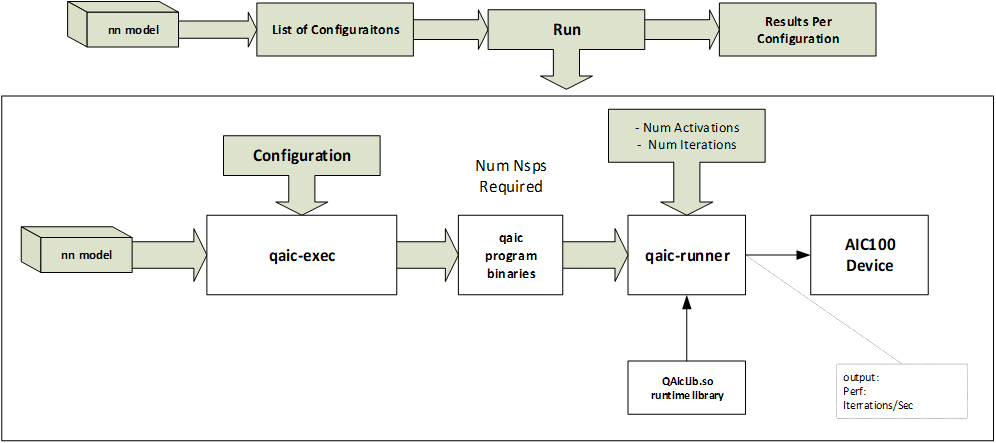
The model configurator tool uses the qaic-compile tool for compiling the model and the qaic-runner tool for running the model.
The tool can be found in:
/opt/qti-aic/scripts/qaic-model-configurator
A README for the tool is also available at
/opt/qti-aic/scripts/qaic-model-configurator/README.
The following figure shows the model configurator.