Disaggregated Serving Support with vLLM
In traditional LLM serving, both the prefill (processing the input prompt) and decode (generating output tokens) typically execute on the same hardware. Disaggregated Serving decouples these stages.
Prefill Stage: Handles the initial processing of the input prompt and generates key-value (KV) cache tensors.Decode Stage: Uses the KV cache to generate output tokens, often in a streaming or batched fashion.
This separation allows each stage to be optimized independently for latency and throughput. For example, prefill can be optimized for Time to First Token (TTFT), while decode can be tuned for Tokens Per Output Time (TPOT).
Architecture
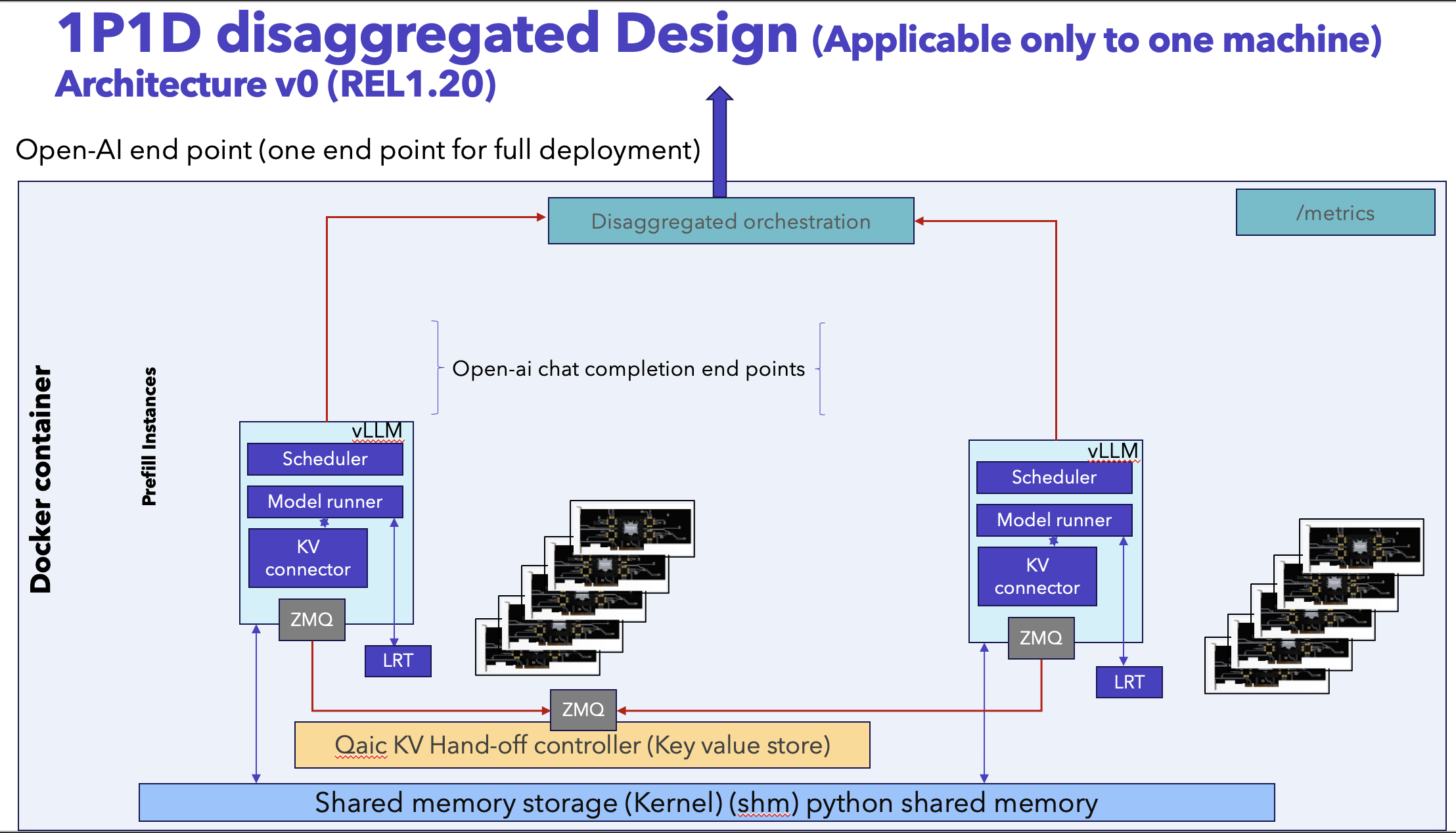
The two stages run as separate vLLM runtimes coordinated by qaic_disagg.
Client
  │  (OpenAI-compatible request)
  ▼
qaic_disagg Router / API Server
  │
  ├── Prefill Stage (vLLM runtime on Device Group A)
  │       └── Generates KV cache
  │
  └── Decode Stage (vLLM runtime on Device Group B)
          └── Consumes KV cache and streams tokens
Key characteristics:
Prefill and decode execute on independent device groups.
KV cache is transferred from prefill to decode.
A single OpenAI-compatible API endpoint is exposed to the client.
Model Settings
This guide uses the following example model:
Model:
meta-llama/Llama-3.2-1B-InstructTask: Text generation (OpenAI Chat Completions)
Prefill max sequences: 1
Decode max sequences: 1
Max model length: 11264
KV cache dtype:
mxint8
Deployment Preparation
Model compilation and container preparation follow the standard Qualcomm vLLM deployment workflow for AI100 platforms. Next section walks through launching Prefill–Decode Disaggregated Serving using the prebuilt Docker image cloud_ai_inference_vllm_disagg with a qaic-disagg entrypoint defined.
Launching Prefill–Decode Disaggregated Serving
Pre-built Docker images for Qualcomm Cloud AI inference with a preconfigured qaic-disagg entrypoint is available in the packages section of Cloud AI Containers repository.
Pull - Pre-built Docker Image
Use the following command to fetch the cloud_ai_inference_vllm_disagg qaic-disagg enabled Docker image from the GitHub container registry:
docker pull ghcr.io/quic/cloud_ai_inference_vllm_disagg:1.21.2.0
Run - Disaggregated Serving
The following example command launches Prefill–Decode disaggregation for meta-llama/Llama-3.2-1B-Instruct.
Note:
HF_TOKEN: In the below command update the Hugging Face authentication token as needed. It’s not required for fully public models.
docker run --rm -it \
  --privileged \
  --shm-size=4gb \
  --network host \
  -e HF_TOKEN=<your_hf_token> \
  -e HF_HOME=/workspace/hf_cache \
  -e QEFF_HOME=/workspace/qeff_cache \
  -v $PWD/hf_cache:/workspace/hf_cache \
  -v $PWD/qeff_cache:/workspace/qeff_cache \
  ghcr.io/quic/cloud_ai_inference_vllm_disagg:1.21.2.0 \
  --model "meta-llama/Llama-3.2-1B-Instruct" \
  --prefill-port 9900 \
  --prefill-device-group 0..15 \
  --decode-port 9800 \
  --decode-device-group 16..23 \
  --port 8000 \
  --prefill-max-num-seqs 1 \
  --decode-max-num-seqs 1 \
  --prefill-max-seq-len-to-capture 256 \
  --decode-max-seq-len-to-capture 256 \
  --max-model-len 11264 \
  --prefill-override-qaic-config "split_retained_state_io:True mxfp6_matmul:True" \
  --decode-override-qaic-config "split_retained_state_io:True mxfp6_matmul:True" \
  --generation-config vllm \
  --kv-cache-dtype mxint8 \
  -v -v -v
This command compiles and generates the required QPCs and launches the disaggregated serving with quantization and KV-cache settings optimized for Cloud AI inference.
Note
For existing QPCs one can update these flags with QPC paths,
--prefill-override-qaic-config "split_retained_state_io:True mxfp6_matmul:True qpc_path={/path/to/your/qpc_path}" \
--decode-override-qaic-config "split_retained_state_io:True mxfp6_matmul:True qpc_path={/path/to/your/qpc_path}" \
Benchmarking
Validate the server using a simple curl request, then measure performance using the provided benchmarking scripts under /opt/qti-aic/integrations/vllm/benchmarks.
Quick Test — Using curl
Send a Chat Completion request using curl command:
curl http://0.0.0.0:8000/v1/chat/completions \
  -H "Content-Type: application/json" \
  -d '{
    "model": "meta-llama/Llama-3.2-1B-Instruct",
    "messages": [
      { "role": "system", "content": "You are a helpful assistant." },
      { "role": "user", "content": "Explain vLLM in one sentence." }
    ],
    "temperature": 0.7,
    "max_tokens": 128
  }'
The response is returned in OpenAI Chat Completion format.
{
  "id": "chatcmpl-a3e7944892814e649ef72e97a77aa13c",
  "object": "chat.completion",
  "created": 1772716202,
  "model": "meta-llama/Llama-3.2-1B-Instruct",
  "choices": [
    {
      "index": 0,
      "message": {
        "role": "assistant",
        "content": "Virtual Learning Lab (VLLM) is an online platform that provides a virtual and immersive learning environment for students, allowing them to interact with instructors, peers, and digital resources in a simulated classroom setting.",
        "refusal": null,
        "annotations": null,
        "audio": null,
        "function_call": null,
        "tool_calls": [],
        "reasoning_content": null
      },
      "logprobs": null,
      "finish_reason": "stop",
      "stop_reason": null,
      "token_ids": null
    }
  ],
  "service_tier": null,
  "system_fingerprint": null,
  "usage": {
    "prompt_tokens": 50,
    "total_tokens": 92,
    "completion_tokens": 42,
    "ttft_excluding_queue_wait_time_in_ms": 16.34836196899414,
    "e2e_inference_in_ms": 424.5595932006836,
    "queue_wait_time_in_ms": 1.4519691467285156,
    "ttft_in_ms": 17.800331115722656,
    "prompt_tokens_details": null
  },
  "prompt_logprobs": null,
  "kv_transfer_params": null,
  "prompt_token_ids": null
}
Benchmarking — benchmark_serving.py (OpenAI Chat Endpoint)
The recommended benchmarking script is: /opt/qti-aic/integrations/vllm/benchmarks/benchmark_serving.py
To run the benchmarking script, open a new terminal window and attach to the Docker container that was created in the previous step.
Use the following command to start an interactive shell inside the running container:
docker exec -it <container_id> /bin/bash
Once the command completes, you will be placed inside the container environment where the benchmarking scripts can be executed.
Note
To identify the container ID, run the following command on the host system:
docker ps
Run the Benchmark Script
python3 /opt/qti-aic/integrations/vllm/benchmarks/benchmark_serving.py \
  --backend openai-chat \
  --host 0.0.0.0 \
  --port 8000 \
  --endpoint /v1/chat/completions \
  --model meta-llama/Llama-3.2-1B-Instruct \
  --dataset-name random \
  --random-input-len 64 \
  --random-output-len 128 \
  --num-prompts 50 \
  --max-concurrency 5 \
  --ignore-eos \
  --seed 1
Note: For long context length anything bigger than or equal to 32K use extra argument –enable-chunked-prefill False.
Example Benchmark Output:
============ Serving Benchmark Result ============
Successful requests: 50
Maximum request concurrency: 5
Benchmark duration (s): 45.25
Total input tokens: 3150
Total generated tokens: 6400
Request throughput (req/s): 1.10
Output token throughput (tok/s): 141.42
Total Token throughput (tok/s): 211.03
---------------Time to First Token----------------
Mean TTFT (ms): 3445.45
Median TTFT (ms): 3615.79
P99 TTFT (ms): 3670.45
-----Time per Output Token (excl. 1st token)------
Mean TPOT (ms): 7.06
Median TPOT (ms): 7.05
P99 TPOT (ms): 7.17
---------------Inter-token Latency----------------
Mean ITL (ms): 7.00
Median ITL (ms): 7.00
P99 ITL (ms): 8.10
==================================================