qaic-util
QAic utility (qaic-util) is used to query Cloud AI accelerator card information, including:
Card status
Firmware versions
DRAM information
Neural network status
Device IDs
Check, reserve and release the physical channels
Multi-device partitioning (MDP)
Enable/disable ECC
Query card
The command to display information about all cards in the system:
sudo /opt/qti-aic/tools/qaic-util -q
The command to display information about a specific card or cards in the system:
sudo /opt/qti-aic/tools/qaic-util -q -d N
sudo /opt/qti-aic/tools/qaic-util -q -d N1 -d Nx
Where N, N1, Nx is the card’s unique ID (0, 1, 2, and so on).
Example:
sudo /opt/qti-aic/tools/qaic-util -q -d 0
Display card information in the UI
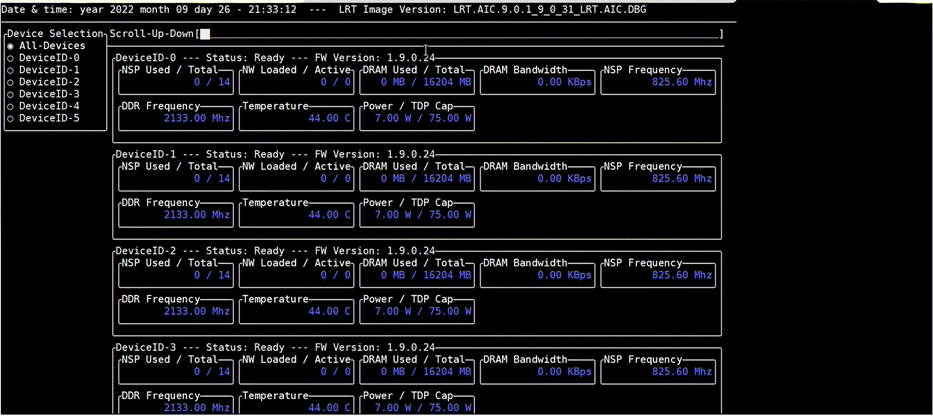
QAic utility (qaic-util) can also display card information in the command line UI.
The user can select all devices or any specific device to monitor using UP/DOWN arrow keys.
If the number of devices are more and cannot fit in a window, the user can scroll up/down using LEFT/RIGHT arrow keys.
The command to launch the UI:
sudo /opt/qti-aic/tools/qaic-util -t S
sudo /opt/qti-aic/tools/qaic-util -t S -d N1 -d Nx
Where S is the refresh rate in seconds and N, N1, Nx is the
card’s unique ID (0, 1, 2, and so on).
Example:
sudo /opt/qti-aic/tools/qaic-util -t 2
Check, reserve and release the physical channels
Check physical channels:
QAic utility (qaic-util) also provides the capability to reserve a physical channel. The user can reserve a physical channel and use it to map the virtual channel during network activation.
The command to check the number of physical channels:
sudo /opt/qti-aic/tools/qaic-util -q -d N | grep -E "QID|Pc"
Example:
sudo /opt/qti-aic/tools/qaic-util -q -d 0 | grep -E "QID|Pc"
QID 0
   Pc Total:7
   Pc Reserved:0
Reserve physical channel:
The command to reserve a physical channel:
sudo /opt/qti-aic/tools/qaic-util -c <numPhysicalChannels> -d N
Example:
sudo /opt/qti-aic/tools/qaic-util -c 2 -d 0
QID 0
    Pc Total:7
    Pc Reserved:2
Release physical channel:
The command to release a physical channel:
sudo /opt/qti-aic/tools/qaic-util -c <numPhysicalChannels=zero> -d N
Example:
sudo /opt/qti-aic/tools/qaic-util -c 0 -d 0
Multi-device partitioning (MDP)
The qaic-util supports the following MDP peer-to-peer (P2P) capabilities.
Enable P2P by disabling ACS.
sudo /opt/qti-aic/tools/qaic-util -a
Check the P2P status.
/opt/qti-aic/tools/qaic-util -r -v
You should see P2P+ and MDP+ for all relevant devices that can run P2P. The devices also need to be connected in a contiguous PCI hierarchy under one PCI switch.
Enable/disable ECC
The qaic-util tool supports enabling and disabling ECC.
For example:
sudo /opt/qti-aic/tools/qaic-util -e enable
sudo /opt/qti-aic/tools/qaic-util -e disable
The following table lists qaic-util argument details.
Argument |
Description |
|---|---|
|
Query command to get device information. If -d is not provided with this option, it queries device information for all devices. |
|
AIC device ID. This can represent either (1) the QID or (2) the PCIe SBDF in the form of SSSS:BB:DD.F of an AIC device. Eg. “-d 0” means AIC device of QID 0; “-d 0000:02:01.0” means AIC device of PCIe SBDF 0000:02:01.0. This option can be used multiple times, and can be used fully with query (-q), json (-j), reserve (-c) and table (-t). The -d option can be used with disable-acs(-a) to indicate QID only but not PCIe SBDF. |
|
Display device information in tabular format. Data is refreshed after every <refresh-rate-sec>. Default is all devices. To select specific devices, use device ID (-d) or filter (-f). Ctrl+C to exit.. |
|
Reserve Physical (DMA) Channels for data transfer. Default is all devices. To select specific devices, use device ID (-d) or filter (-f). |
|
Dumps output of qaic-util to the json file provided. To select specific devices, use device ID (-d) or filter (-f). |
|
Filter the devices based on property. Supported properties are: Status, MHI_ID, Device Capabilities, and Board serial. Can be used with query (-q), json (-j), reserve (-c) and table (-t) Eg: ./qaic-util -q -f “Board serial==SERIAL_012345” |
|
Displays devices basic info in tree format. Use verbose(-v) to see all pcie hierarchy. |
|
Adds verbosity. Currenlty only supported with –tree-view(-r). |
|
MHI based soc-reset. Default is all devices. To select specific devices, use device PCI or board serial ID (-p). |
|
Unique PCI BDF or board serial ID for the device(s) to reset. This option can be used multiple times and can only be used with reset option (-s). |
|
Disable Access Control Service (ACS) between devices. Default is all qaic devices systemwide. The –aic-device-id(-d) and/or –pci-sbdf-for-disable-acs(-b) options can be used to select among which devices ACS should be disabled. Eg: ‘./qaic-util -a’ Disable ACS systemwide. ‘./qaic-util -a -d 0 -d 5’ Disable ACS between QID 0 and 5. ‘./qaic-util -a -b “0000:02:00.0”’ Disable ACS between all devices under that pci bridge. ‘./qaic-util -a -d 7 -b “0000:a3:00.0”’ Disable ACS among those devices. If ACS disable is not possible because of not being able to find a P2P connection, then QS_UNSUPPORTED(11) is returned. |
|
The PCIe SBDF of a qaic device or of a PCIe bridge under which qaic device(s) reside. If a bridge is selected, all qaic-devices under it will be considered. Can only be used with –disable-acs(-a) command. Can be used multiple times and can be used with –aic-device-id(-d) option in the QID sense. The -b option differes from the -d option with PCIe SBDF in that the -b option can represent an AIC device as well as a PCIe bridge device, whereas the -d option can only represent an AIC device. |
|
ECC enable or ECC disable. |
|
help |