vLLM
vLLM is an open-source inference and serving framework for large language models (LLMs). This section describes how to run vLLM on Qualcomm Cloud AI using container images, and links to feature documentation and reference material.
Architecture
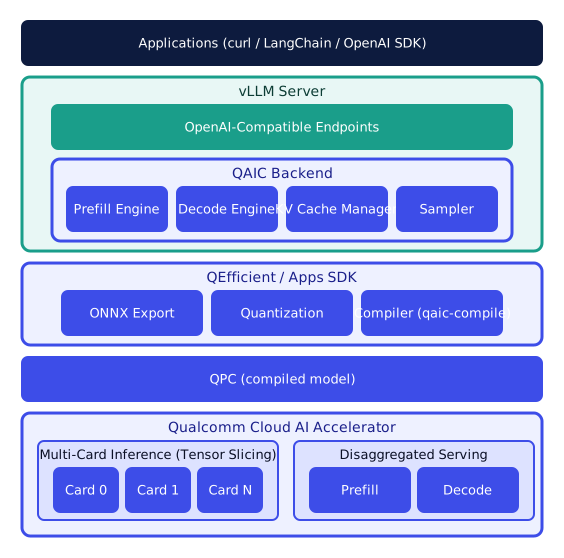
vLLM serving stack on Qualcomm Cloud AI accelerators.
Highlights
Pre-built Docker image - run vLLM with a pre-built Qualcomm Cloud AI Docker image.
Disaggregated Serving - scale prefill and decode independently for higher throughput and better utilization.
Compute Context Length (CCL) - accelerate long-context prompts by switching compute context lengths at runtime.
Speculative Decoding and Prefix Caching - reduce latency with draft-model proposals and prefix reuse.
On-Device Sampling - run sampling on the accelerator to lower host overhead.
Quantization - MXFP6 weight compression and MXINT8 activations for higher throughput and lower memory.
Tool Call Parsing and Guided Decoding - structured outputs and constrained decoding.
Multimodality and LoRAX - vision-language models and adapter-based personalization.
See Supported Features for a complete list.
Quick Start
Run your first model with vLLM on Qualcomm Cloud AI accelerators:
Start the server:
docker run --rm -it --network host \
  --device /dev/accel/ \
  --shm-size=2gb \
  ghcr.io/quic/cloud_ai_inference_vllm:1.21.2.0 \
  --host 127.0.0.1 \
  --port 8000 \
  --model TinyLlama/TinyLlama-1.1B-Chat-v1.0 \
  --max-model-len 256 \
  --max-num-seq 16 \
  --max-seq-len-to-capture 128 \
  --quantization mxfp6 \
  --kv-cache-dtype mxint8
Send a chat request:
curl http://127.0.0.1:8000/v1/chat/completions \
  -H "Content-Type: application/json" \
  -d '{
    "model": "TinyLlama/TinyLlama-1.1B-Chat-v1.0",
    "messages": [
      { "role": "system", "content": "You are a helpful assistant." },
      { "role": "user", "content": "Explain vLLM in one sentence." }
    ],
    "temperature": 0.7,
    "max_tokens": 128
  }'