Download SDKs
The Platform SDK and Apps SDK are available from Qualcomm Package Manager (QPM).
What You Need
Platform SDK - Drivers, firmware, and runtime libraries
Apps SDK - Compilation tools and development libraries
Registration
First-time users must register for a Qualcomm ID.
Download Steps
Log in to Qualcomm Package Manager
Download the Platform SDK
Download the Apps SDK
Select your options:
Operating System: Linux (Debian)
SDK Version: Select the desired version
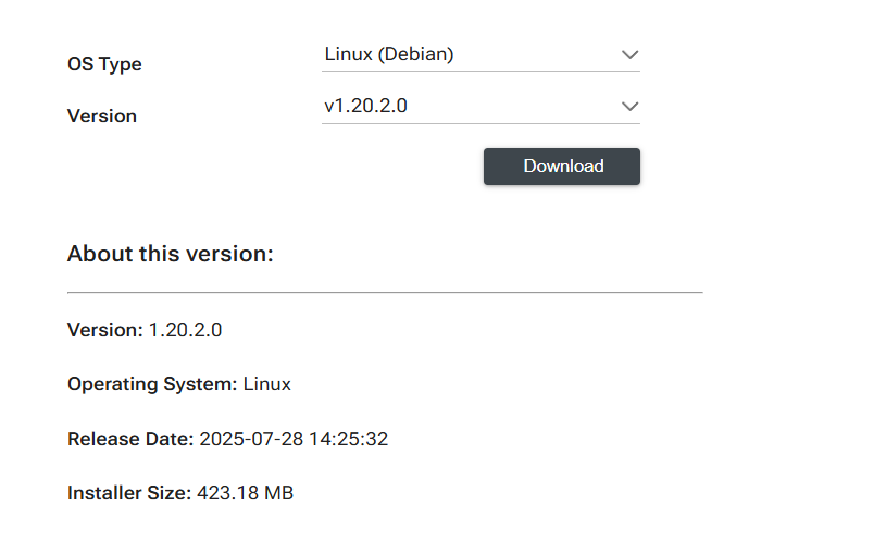
Click Download to download the SDK zip file
Note
The Linux (Debian) download option includes Debian and RPM packages for x86-64 and AArch64.
SDK Package Contents
Platform SDK
Filename format: aic_platform.Core.<version>.Linux-AnyCPU.zip
Example: aic_platform.Core.1.21.2.0.Linux-AnyCPU.zip
├── aarch64/
│   ├── deb/          # Debian packages for ARM64
│   └── rpm/          # RPM packages for ARM64
├── x86_64/
│   ├── deb/          # Debian packages for x86-64
│   └── rpm/          # RPM packages for x86-64
└── common/           # Shared test data and tools
Apps SDK
Filename format: aic_apps.Core.<version>.Linux-AnyCPU.zip
Example: aic_apps.Core.1.21.2.0.Linux-AnyCPU.zip
├── aarch64/
│   └── deb/          # Debian packages for ARM64
├── x86_64/
│   ├── deb/          # Debian packages for x86-64
│   └── rpm/          # RPM packages for x86-64
└── common/           # Examples, integrations, and tools
Continue to SDK Installation.