Kubernetes
AI applications built for the Cloud AI inference accelerator can be containerized with Docker (see Docker) and deployed with Kubernetes.
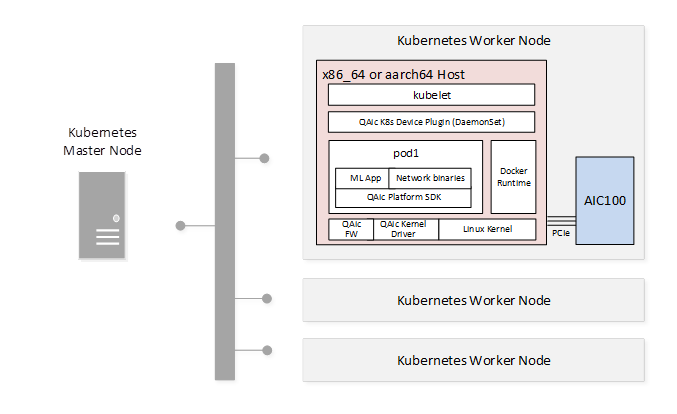
The following figure shows a sample Kubernetes deployment.
Tip
Use the cloud_ai_inference_ubuntu24 Docker image to quickly containerize your Cloud AI workload.
QAic K8s Device Plugin
The QAic K8s device plugin exposes Cloud AI device resources to containerized AI applications. The plugin supports:
Reporting the number of QAic devices on each cluster node
Monitoring QAic device health status
QAic device allocation and cleanup
Download the plugin from the Cloud AI Containers repository:
docker pull ghcr.io/quic/cloud_ai_k8s_device_plugin:1.21.2.0
Package Contents
The plugin source is available in the Cloud AI Apps SDK installer: qaic-apps-1.x.y.z/common/tools/k8s-device-plugin.
Plugin source
Docker image build script
Deployment scripts (YAML)
Device Plugin Deployment Script (deploys Qaic K8s Device Plugin as DaemonSet)
Sample Cloud AI Workload Deployment Script
Device Plugin Configuration
Refer to qaic-device-plugin.yml in the Cloud AI Apps SDK installer: qaic-apps-1.x.y.z/common/tools/k8s-device-plugin for a sample QAic K8s device plugin configuration.
The following plugin options are available:
Allocate by Card Type (QAIC_SKU_BASED_RESOURCE_ENABLED)
Fractional allocation (QAIC_FRACTIONAL_DEVICE_STRATEGY)
Allocate by Card Type
Allocation can be done using either qaic or qaic-<sku>
(std | pro | ultra)
qaicsetting doesn’t look for what type of card SKU is present, it just allocates the available resources.qaic-<sku>setting will help to allocate resources based on card SKU.
In the qaic-device-plugin.yml file, set or unset the QAIC_SKU_BASED_RESOURCE_ENABLED
flag to enable qaic-<sku> or qaic resources.
Example:
env:
   - name: QAIC_SKU_BASED_RESOURCE_ENABLED
   value: "1"
securityContext:
   privileged: true
volumeMounts:
   - name: device-plugin
In the deploy-qaic-single.yaml file, specify the supported device resource, for example:
qaic, qaic-std, qaic-pro, or qaic-ultra.
Example for qaic-ultra card SKU:
spec:
containers:
- name: qaic
   image: ghcr.io/quic/cloud_ai_inference_ubuntu24:1.21.2.0
   imagePullPolicy: Never
   command: [ "/bin/bash", "-ce", "tail -f /dev/null" ]
   securityContext:
      runAsUser: 1000
      runAsGroup: 995   # Local machine group qaic
   resources:
      limits:
      qualcomm.com/qaic-ultra: 1
Fractional Allocation
Fractional allocation of the device resources is supported with the QAIC_FRACTIONAL_DEVICE_STRATEGY flag.
Allocate half of device resources:
env:
   - name: QAIC_FRACTIONAL_DEVICE_STRATEGY
   value: "Half"
Allocate a quarter of device resources:
env:
   - name: QAIC_FRACTIONAL_DEVICE_STRATEGY
   value: "Quarter"
Deployment Configuration
A Kubernetes deployment is defined using a YAML configuration file. The following example defines a deployment for a single Cloud AI device.
deploy-qaic-single.yaml:
apiVersion: apps/v1 # for versions before 1.9.0 use apps/v1beta2
kind: Deployment
metadata:
name: qaic-deployment
namespace: kube-system
spec:
selector:
   matchLabels:
      app: qaic
replicas: 1 # tells deployment to run 1 pods matching the template
template:
   metadata:
      labels:
      app: qaic
   spec:
      containers:
      - name: qaic
      image: ghcr.io/quic/cloud_ai_inference_ubuntu24:1.21.2.0
      imagePullPolicy: Never
      command: [ "/bin/bash", "-ce", "tail -f /dev/null" ]
      securityContext:
         runAsUser: 1000
         runAsGroup: 995   # Local machine group qaic
      resources:
         limits:
            qualcomm.com/qaic: 1
Prerequisites for Deployment
Platform SDK installed on the Kubernetes worker node (required for QAic Linux kernel drivers and firmware images.)
Cloud AI devices available on the worker node
QAic K8s Device Plugin Docker image available through a local Docker registry or preloaded on the Kubernetes worker node
Cloud AI workload Docker image available through a local Docker registry or preloaded on the Kubernetes worker node